A 10-key typing test evaluates how accurately and efficiently you enter numbers using a numeric keypad. Unlike a traditional paragraph typing test, it may present long groups of digits, decimals, or numerical records. Employers sometimes use these assessments for data entry, bookkeeping, inventory, accounting support, and other roles involving repeated numerical information.
If you've been practicing ordinary text WPM, a 10-key assessment can feel unfamiliar. The keypad has its own finger positions and rhythm, and many tests measure keystrokes per hour rather than words per minute. This guide explains what to expect, which skills matter, and how to build confidence through realistic numerical drills.
What Does “10-Key” Mean?
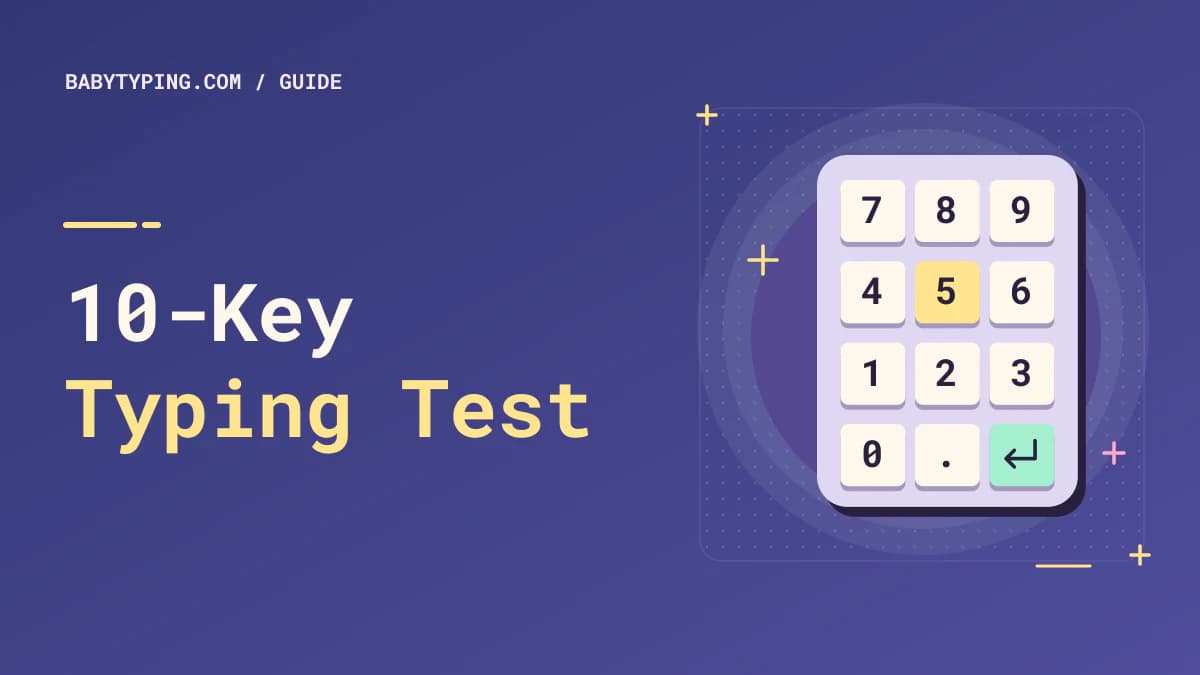
The term traditionally refers to the ten digit keys, 0 through 9, on a numeric keypad. A full-size computer keyboard often places those keys on the right, alongside Enter, a decimal point, and arithmetic operators. The arrangement resembles a calculator more than the horizontal number row above the letters.
A typical keypad has 7, 8, 9 on the top digit row; 4, 5, 6 in the middle; 1, 2, 3 below; and 0 at the bottom. Many keypads have a raised marker on 5, which acts as a tactile reference for positioning your hand. Some laptops do not have a dedicated keypad, so you may need an external one if the employer permits it.
How is 10-key typing different from normal typing?
Standard text typing uses letters, spaces, punctuation, and a five-character definition of a word. Numeric keypad entry focuses on digits and sometimes decimal points or arithmetic symbols. A person can be an excellent prose typist but a beginner at keypad entry, or vice versa.
The goals also differ. In a document, a misplaced letter may be easy to notice. In an invoice, entering 1870 instead of 1780 may be harder to detect and could materially change the information. Numeric tasks demand attention to exact sequences, not merely a good-looking speed score.
Learn the Basic Numeric Keypad Finger Position
A common starting method uses the right index finger near 4, the middle finger near 5, and the ring finger near 6. Each finger then moves vertically to the digits above and below its home position. The thumb commonly operates 0, while the little finger may help with Enter or other keypad functions according to comfort and the keypad design.
Finger methods vary slightly among training systems. Use a consistent pattern that lets your hand stay relaxed. Feel the marker on 5 to reorient without looking down. A common error is reaching with one finger for every number; this can create extra movement and make transitions harder to automate.
Begin with simple column sequences, such as 741, 852, and 963, entered accurately. Next use mixed patterns like 2580, 1479, and 5603. Then move to fictional transaction-style amounts containing decimal points. Quality of movement matters more than speed in your first sessions.
What Is KPH in a 10-Key Typing Test?
KPH commonly means keystrokes per hour. A timed test counts inputs over a shorter period and scales the rate to one hour. For example, if a person enters 500 counted keystrokes in five minutes, the gross hourly pace is 500 × (60 ÷ 5) = 6,000 KPH.
An assessment might also calculate adjusted or net KPH after applying an error rule. Different platforms may count certain keys differently, including Enter, decimal points, corrections, or field-navigation keys. Therefore, KPH figures from different systems are not always directly comparable.
Example KPH calculations
| Counted keystrokes | Test time | Gross hourly pace |
|---|---|---|
| 400 | 5 minutes | 4,800 KPH |
| 600 | 5 minutes | 7,200 KPH |
| 750 | 5 minutes | 9,000 KPH |
| 1,000 | 10 minutes | 6,000 KPH |
These are arithmetic examples only, not pass/fail thresholds. Employers choose their own standards. Do not convert a normal text WPM score into a professional 10-key qualification without actually assessing numeric entry.
What Happens During a Numeric Data Entry Test?
Some tests show a stream of numbers for you to reproduce. Others display columns of amounts, records in a table, or fields that you must enter in the correct order. The assessment may be timed, and the platform might measure both total keystrokes and errors. Some tests prohibit corrections; others allow them, but the time cost still matters.
Before beginning, read the rules carefully. Confirm whether you should use the physical keypad, whether Num Lock must be enabled, and whether Enter or Tab advances to the next field. If the test requires exact decimals, keep trailing zeros where specified. 12.50 may be semantically equivalent to 12.5 in some applications, but not in a strict copying exercise.
Set up the keypad correctly
Check whether the keypad actually enters digits; with Num Lock disabled, some keys act as navigation controls. Use a stable workstation where your shoulders are relaxed and the keypad is within easy reach. If a separate keypad is placed too far to the side, your arm may remain in an awkward position. Adjust your setup for comfort before starting long practice sessions.
Beginner Drills for 10-Key Typing
Drill 1 – Identify the home position. Without looking down, place fingers over 4, 5, and 6; locate the raised 5 marker and type short central-row groups. Reset whenever you lose your place.
Drill 2 – Practice vertical columns. Type small groups that move between top, middle, and bottom digit rows. Start slowly and avoid moving the whole arm for every number.
Drill 3 – Use random four-digit sets. Copy examples such as 5731, 2048, 6195, and 8307. Read the group first, then enter it smoothly. Check accuracy before increasing speed.
Drill 4 – Add decimal amounts. Use invented values such as 12.80, 45.05, and 109.99. Pay special attention to decimal placement.
Drill 5 – Copy mock records. Create several rows of fictional invoice amounts or inventory counts, separated exactly as specified. Practice reading the source, entering the number, and verifying the field.
Keep these exercises separate from real customer or financial records. Practice data should be fictional so you do not expose private information.
A Two-Week 10-Key Practice Framework
During the first few sessions, spend about ten minutes learning positions and working on error-free digits. Then introduce realistic amounts and longer groups. In the second week, add short timed drills and compare accuracy across repeated attempts. Do not set an arbitrary promise about reaching a particular KPH; consistent technique develops at different rates.
A typical fifteen-minute session can include three minutes of warm-up, five minutes of mixed-digit practice, four minutes of decimal records, and three minutes of timed measurement and review. If your hands become uncomfortable, stop and rest. Sustainable practice is more useful than forcing speed while tense.
Measure both speed and correctness
Track at least the duration, gross KPH if available, number of errors, and type of mistakes. Swapping adjacent digits suggests a sequencing problem. Omitting zeros suggests you are reading groups too quickly. Misplacing decimal points suggests you should practice complete values instead of isolated digits.
Review a small sample of records manually. A test result is useful only if it reflects correct information. If you are preparing for a job, match the test format described by the employer; a game with random digits may not resemble their data entry workflow.
When to Practice 10-Key Instead of WPM
Use 10-key training when your work involves large volumes of numbers entered through a keypad. Use a traditional text test when your task is mostly emails, notes, or paragraphs. Many jobs involve both, so splitting practice time can make sense.
If you type customer addresses, descriptions, and short notes, your text typing speed remains relevant. If you enter invoice totals or numeric inventory codes, dedicate separate practice to keypad entry. Read our data entry typing speed guide for a fuller comparison of job requirements.
Common Problems and How to Fix Them
Numbers appear as arrows instead of digits: Check Num Lock and the device's keypad settings. Frequent digit swaps: Slow down, read each group, and check before moving on. Decimal errors: Practice complete quantities rather than isolated punctuation. Hand strain: Reposition the keypad closer and take breaks. High KPH but poor accuracy: Reduce pace until you can produce clean records consistently.
Another mistake is measuring with an ordinary paragraph tool and assuming the resulting WPM predicts KPH. Those assessments use different character patterns and may have different rules. Make sure the measurement matches your actual target skill.
Frequently Asked Questions
Is 10-key typing the same as touch typing?
They are related but distinct. Touch typing commonly refers to using learned finger positions for general keyboard text. 10-key typing focuses on numeric keypad entry without repeatedly looking down.
Do I need a full-size keyboard for a 10-key test?
You need access to an appropriate numeric keypad if the test specifies it. A full-size keyboard or an allowed external keypad may work, but follow the employer's equipment instructions.
What KPH should I aim for in data entry?
There is no universal cutoff. Look for the explicit assessment requirement and practice accurate input at that pace. A high gross KPH without sufficient accuracy may not meet the employer's standard.
Does the number 5 have a bump on numeric keypads?
Many physical keypads use a tactile marker on 5 to help orient your hand. The exact design varies by device, so inspect the keyboard you are using.
Can I practice 10-key and WPM on the same day?
Yes. Treat them as separate exercises and record the results independently. A free words-per-minute typing test can track text skills while numeric drills develop keypad fluency.
Practice the Input That Matters
A 10-key test is not simply an ordinary typing test with more digits. It measures keypad familiarity, exact numeric entry, and sustained concentration. Learn the keypad's reference position, practice realistic fictional records, and interpret KPH alongside accuracy. That combination prepares you better than chasing a single large number.